“Just send them to the product.” It is one of the most common instructions we hear when a brand starts running ads, and sometimes it is exactly right. Often, though, it is too early. A product page is a closer, not an introduction. Here is how to tell whether yours is ready for people who have never heard of you, and where to send them if it is not.
We wrote recently about why the homepage is the wrong place to send paid traffic. The product page is the other common choice. It is usually better, but not always.
A product page is a closer, not an introduction
Think about who normally lands on a product page from inside your own site. They have browsed, compared a few options and picked one. They know the brand. The page only has to close the deal.
A cold click from paid social has done none of that. That person saw one image in their feed, between a friend’s holiday photos and a news story. Dropping them onto a page built to close assumes they have made a decision they have not made yet.
That does not mean product pages are wrong for paid traffic. Someone searching for the exact product by name is ready, so send them straight to it. The same goes for people you are reminding about something they already looked at. The real question is not “product page or not”. It is “is this person ready to buy this specific thing?”
Is your product page ready for strangers?
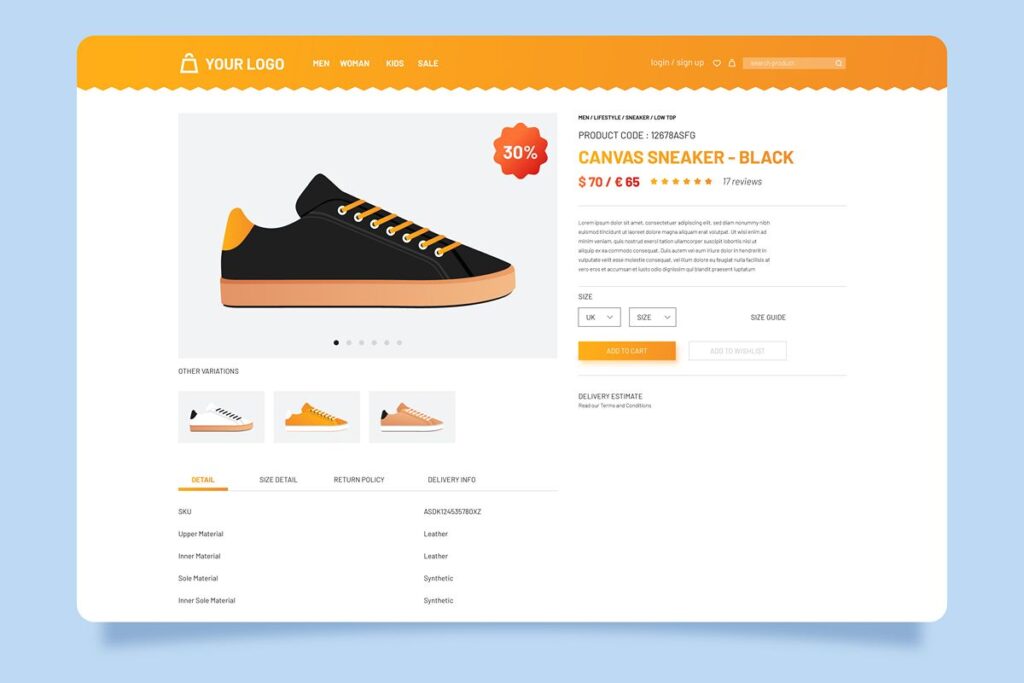
A product page can take cold traffic if it answers, near the top and on a phone, the questions a stranger actually has:
- What is it, and who is it for? In plain words, not your internal product names.
- What does it cost, and does the price make sense? What is included, which size or option, and finance if it is a big purchase.
- When will it arrive, and what does delivery cost? Hidden delivery details are where a lot of cold visitors quietly give up.
- Why should I trust you? Real reviews, visible near the price, not buried at the bottom.
- What if it is wrong? Returns, stated plainly.
- What else might suit me? Related products, for the person who likes the brand but not this exact item.
If several of those are missing, the page will burn through cold budget no matter how good the ad is.
Cold and warm traffic need different destinations
A simple way to think about it:
- New audiences on paid social go to a collection page or a landing page built around one angle, so they can see the range and the reason to care.
- Searches for a specific product go to that product page.
- People who have already browsed can go back to the product they looked at.
- Returning customers go to the product, or to an offer made for them.
One audience, one matching page. It is the same idea behind building pages for each stage of the buyer, which we covered in what a new ecommerce marketing manager should fix in their first 90 days.
The middle step most brands skip
Between the ad and the product page, most brands need one more page: a collection or angle page that does the introducing. It shows the range, explains the problem the product solves, carries some proof, and lets the visitor choose. Then the product page can do what it is good at, which is closing.
It does not need to be elaborate. A well-built collection page with a clear headline that matches the ad, a few lines of explanation and reviews near the top will do more for cold traffic than any amount of tweaking the ad. If you want to go further on the page itself, our piece on whether design or copy matters more on a landing page is a good next read.
How to spot it in your own account
You do not need a benchmark from someone else’s account to see this. Compare your own numbers:
- Look at paid social campaigns aimed at new audiences. Are they pointing straight at single product pages?
- Compare them with campaigns reminding past visitors. If the reminders do far better on the same products, the product page is probably fine and the cold visitor simply was not ready.
- Open your advertised product pages on your phone. Can you see delivery, reviews and returns without scrolling a long way?
One thing to separate out: if people add to basket and then leave, the problem is usually the checkout, not the product page. That is a different fix, covered in our post on the top reasons for basket abandonment.
The order we fix it in
- Run the checklist on your top three advertised products.
- Fix the gaps on those pages. It is usually delivery, reviews and returns.
- Point cold campaigns at a collection or angle page until the product pages pass.
- Keep product pages for product searches and people who have already browsed.
- Then test cold traffic to your strongest product page against the collection page, one product at a time, and let your own numbers decide.
Where this gets you
We have taken brands on Meta that could barely crack £1,000 a month to somewhere between £20,000 and £30,000 a month, and matching each audience to the right page is a big part of how. None of it is glamorous. It just stops paying for clicks that land somewhere that was never going to sell to them.
If you would like your live ads mapped against where they actually land, we can do that in a free chat. Or pop down to Maisemore, the kettle is on.
Written by the Onward team, Maisemore.